

Yes, an individual K-12 teacher can use FERPA-compliant AI tools without waiting on district procurement, as long as you follow one hard rule: never feed student-identifiable education records into a consumer AI account that lacks a signed data protection agreement. Everything else is detail.
The two safe paths are simple. Either you keep your AI use limited to non-identifying tasks (drafting a rubric, planning a unit, generating discussion questions), or you use a tool built specifically for teacher-facing student data work, like Letsmakeai. FERPA sets the legal floor here, and COPPA adds a layer for kids under 13. The Student Data Privacy Consortium exists precisely because so many districts have gaps in vetting new AI vendors before teachers start using them.
Some tasks are low risk. Others aren't:
- Low risk: Generic lesson plans, blank rubrics, sample questions, writing prompts with no student names or work attached.
- High risk: Pasting IEP language, grade rosters, behavior logs, or any handwritten student submission into a tool without a district-signed DPA.
If a task touches real student data and you're unsure about the tool's contract terms, pause and check with your IT or admin team before you paste anything.
Key Takeaways
Teachers can use AI safely in the classroom when they either avoid identifiable student data entirely or choose a tool with real DPA coverage and export/delete controls.
| Point | Details |
|---|---|
| Know the FERPA test | A tool is riskier if it stores or infers student data long term rather than processing it and forgetting it. |
| Separate low-risk from high-risk tasks | Generic lesson planning is safe; grading real student work needs a vetted, DPA-backed tool. |
| De-identify beyond names | Strip unique ID patterns, grade sequences, and contextual details, not just the student's name. |
| Lock down account settings | Turn off chat history, disable unapproved connectors, and enable two-factor authentication. |
| Choose teacher-first tools when handling grades | HomeworkHelper on LetsMakeAI.fun offers OCR grading, export/delete controls, and no procurement requirement. |
Table of Contents
- What Does "FERPA-Compliant" Actually Mean for a Teacher Using AI?
- Which Classroom AI Tasks Are Safe Without District Approval?
- How Do You De-Identify Student Work Before Using AI?
- What Account Settings Should Teachers Check First?
- When Should a Teacher Pause and Ask for District Approval?
- How Should Teachers Talk to Families About AI Use?
- Why Human Review Still Matters for Grading
- A Teacher-First AI Tool That Skips the Procurement Wait
- Where to Learn More and Verify These Guardrails
- Frequently Asked Questions
- Sources
What Does "FERPA-Compliant" Actually Mean for a Teacher Using AI?
FERPA's test isn't about the AI's marketing copy. It's about whether the system creates or maintains education records. A stateless tool that processes your input and forgets it is fundamentally lower risk than one that stores, profiles, or trains on student data long term.
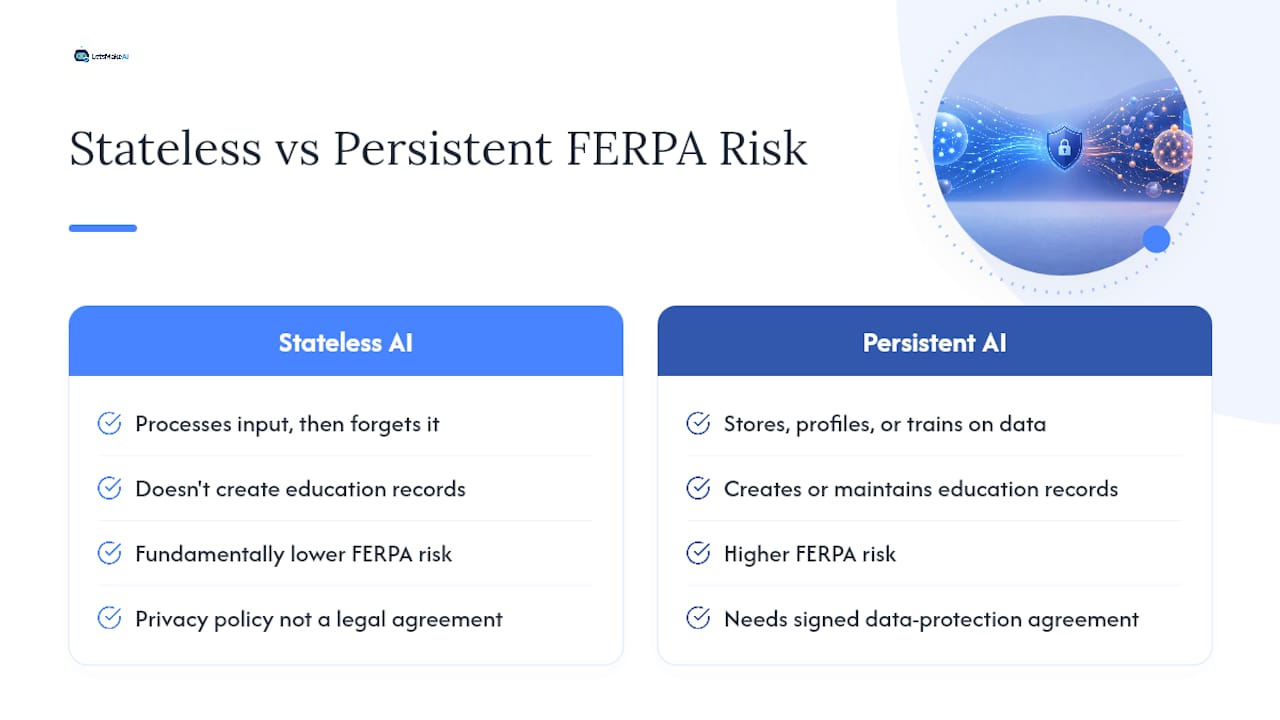
That distinction matters because a vendor's privacy policy posted online isn't the same as a legal agreement. Under FERPA's school-official exception, a district (or an equivalent teacher-level agreement) has to actually execute a data protection agreement with the vendor. Without that signature, pasting a student's grades or IEP notes into a general-purpose chatbot is an unauthorized disclosure, even if you meant no harm.
Removing a name isn't enough, either. Student ID sequences, unusual grade patterns, or specific behavioral details can reidentify a kid even after you've scrubbed the obvious fields. Effective de-identification means generalizing or dropping anything unique, not just the name line.
Which Classroom AI Tasks Are Safe Without District Approval?
Think of it as a spectrum from "no student data touched" to "full education record exposed."
Safe without any approval:
- Brainstorming lesson objectives aligned to a standard
- Drafting a generic rubric template
- Generating sample test questions with no real student answers attached
Needs a vetted, DPA-backed tool:
- Grading actual student work, including handwritten submissions
- Personalized parent communication referencing a specific student's performance
- Behavior or intervention notes tied to a named student
Never do this in a consumer tool:
- Pasting full class rosters, grade sheets, or IEP text into ChatGPT or similar general-purpose accounts with no signed agreement covering your use
How Do You De-Identify Student Work Before Using AI?
Say you want feedback on essay structure without exposing a student's identity. Strip the name, obviously, but also replace any specific reference to their town, sports team, or family situation with a generic placeholder. If you're asking AI to help draft feedback language for a grade pattern, describe the skill gap ("struggles with thesis clarity") instead of quoting the student's exact wording verbatim alongside their grade history.
For grading workflows specifically, tools like HomeworkHelper are built to process handwritten submissions through OCR without requiring you to manually transcribe and paste identifiable text into a chat window. That structural difference (upload versus copy-paste into an open prompt) is part of why some teacher-first tools carry lower FERPA exposure than general AI assistants.
What Account Settings Should Teachers Check First?
Before you touch any AI tool with real classroom content, run through a quick technical check:
- Turn off chat history or memory features if the tool offers them.
- Disable any connectors to your school email, calendar, or drive unless your district has approved that integration.
- Use single sign-on through your school account when available, so access ties back to an institutional identity.
- Turn on two-factor authentication on your personal AI accounts, since a compromised login is a data breach regardless of the vendor's policies.
Pro Tip: Check whether the vendor's terms mention "training on user inputs." If the answer is yes and there's no opt-out, treat that tool as unsuitable for anything involving real student work.
When Should a Teacher Pause and Ask for District Approval?
Stop and escalate if a tool wants to sync your gradebook, if it stores conversation history tied to student names, or if you can't find a straight answer to "does the district have a signed agreement with this vendor?" Guidance from AI for Education's compliance checklist lays out exactly what to ask: what data is collected, where it's stored, whether it trains models on your inputs, how long it's retained, and whether subprocessors are disclosed.
State laws add another wrinkle. Many states layer additional vendor-registration or consent requirements on top of FERPA, particularly for younger students covered by COPPA. If you teach elementary grades, that's one more reason to lean toward a teacher-first product with documented DPA language rather than a general consumer account.
How Should Teachers Talk to Families About AI Use?
Say it plainly, and say it early. A line in your syllabus or a short email works: "I use AI tools to help draft feedback and plan lessons. Student work processed through these tools is handled under [vendor name]'s data agreement, and I do not enter identifying student information into consumer AI accounts." Experts consistently recommend this kind of transparency, and it tends to head off the awkward parent conversation that happens when AI use surfaces without warning.
Documentation matters too. Guidance from UNC's teaching center recommends keeping a simple record of which tools you use, for what purpose, and how you're balancing speed against accuracy in grading decisions.
Why Human Review Still Matters for Grading
I'd put it bluntly: the biggest FERPA risk isn't the tool, it's the habit of treating AI output as final. Practical guidance for classroom AI use is consistent on this point. AI should draft, suggest, and speed things up. You still read every grade, every comment, every parent message before it goes out.
That's also why proof points matter more than a compliance badge. HomeworkHelper on LetsMakeAI.fun was built by teachers, for teachers, and it's already graded hundreds of thousands of papers without requiring district sign-off. A SOC 2 badge alone doesn't tell you whether a vendor trains on your inputs. Contract language and export/delete controls do.
A Teacher-First AI Tool That Skips the Procurement Wait
If you've been putting off AI in your classroom because the vetting process feels like a full-time job, Letsmakeai was built to skip that wait entirely. No district sign-off, no procurement cycle, just a tool designed from the ground up for individual teachers.
It handles OCR grading of handwritten submissions, custom rubric support, and batch grading, with export and deletion controls built in so your records don't sit in someone else's system indefinitely. You still run the vetting checklist above before feeding it real student work, and you still keep a human eye on every grade before it posts. HomeworkHelper runs on a free trial and subscription model, no IT ticket required. Start a trial and grade your first stack of papers this week.
Where to Learn More and Verify These Guardrails
- Chalkbeat's nine tips back the transparency guidance above.
- K12SafeList's FERPA guide explains DPA requirements in plain language.
- AI for Education's checklist covers data storage, training use, and retention questions to ask any vendor.
- Sample parent email line: "I use AI tools that don't retain identifying student information; details available on request."
Frequently Asked Questions
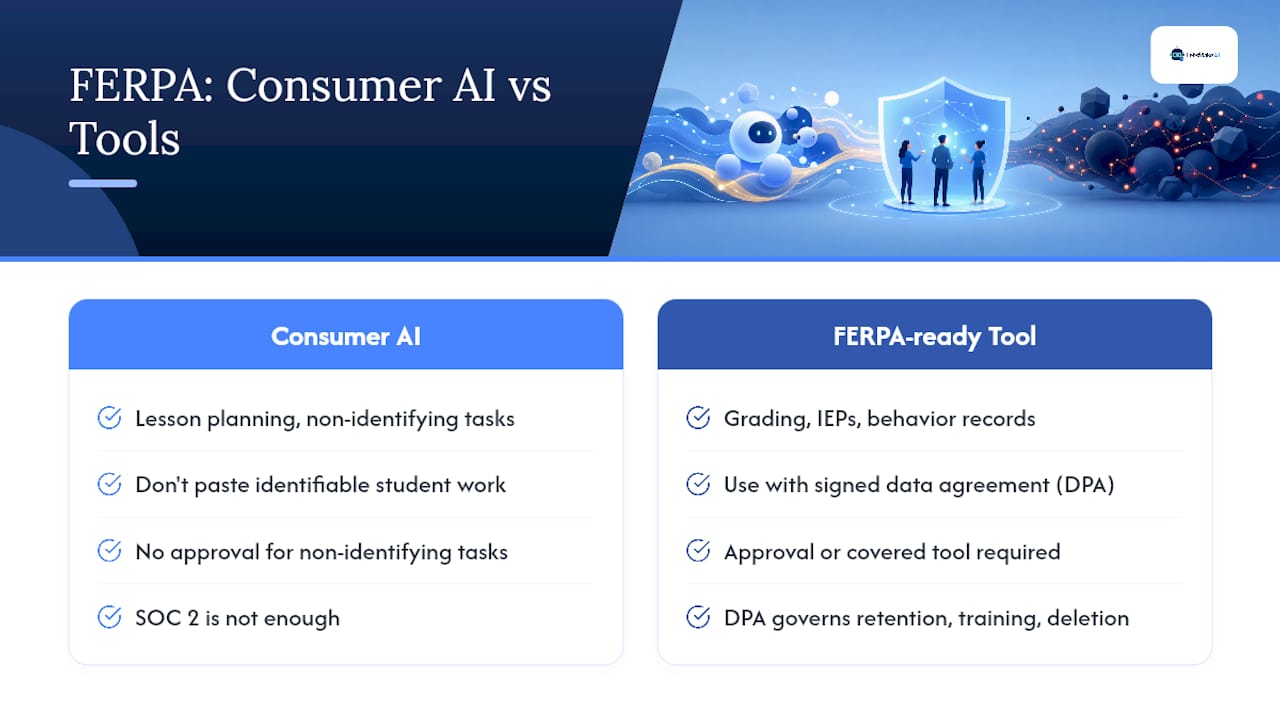
Can I use ChatGPT to grade student essays? Not if you paste identifiable student work into a standard consumer account without a signed data agreement. That's an unauthorized disclosure risk under FERPA, regardless of intent.
Do I need my principal's permission to use any AI tool? Not for non-identifying tasks like lesson planning. You do need approval, or a properly covered tool, for anything involving real grades, IEPs, or behavior records.
Is a vendor's SOC 2 certification enough proof of compliance? No. SOC 2 covers security practices, not the contractual DPA terms that govern data retention, training use, and deletion rights that FERPA actually requires.
What makes HomeworkHelper different from a general AI chatbot? It's built specifically for teacher grading workflows, with OCR handling for handwritten work and export/delete controls, rather than a general-purpose chat interface with no teacher-specific data handling.
This article is general information, not a substitute for advice from a qualified lawyer. Consult a qualified legal professional about your own circumstances before acting on anything here.
Sources
- Using AI — and protecting student privacy — is hard. Here are 9 tips.
- Teaching generative AI usage guidance
- FERPA-Compliant AI Tools for Teachers — K12SafeList
- FERPA compliance checklist for AI tools
- When AI is FERPA-compliant — and when it is not